


The Anatomy of a Flawless Millwork Shop Drawing
If you search online for “millwork shop drawings,” you are flooded with generic SEO fluff. Most articles give you basic definitions (“What is millwork?”) and surface-level bullet points (“Ensure accurate dimensions!”). They are written by content agencies, not woodworkers, draftsmen, or project managers.
In the real world, turning high-end design intent into precision-cut sawdust is a messy, expensive process. A mediocre drawing triggers the dreaded “Revise and Resubmit” doom-loop, stalling projects for weeks. A bad drawing passes through unnoticed until a $20,000 architectural feature is cut incorrectly on the CNC floor or fails to fit between two out-of-plumb masonry walls.
To write a flawless shop drawing, you must treat the paper (or screen) as a comprehensive engineering map. Using a custom SolidWorks luxury kitchen build as our case study, let’s deconstruct the exact anatomy required for a professional-grade millwork submittal.
1. The Brain: Project Metadata & The Revision Log
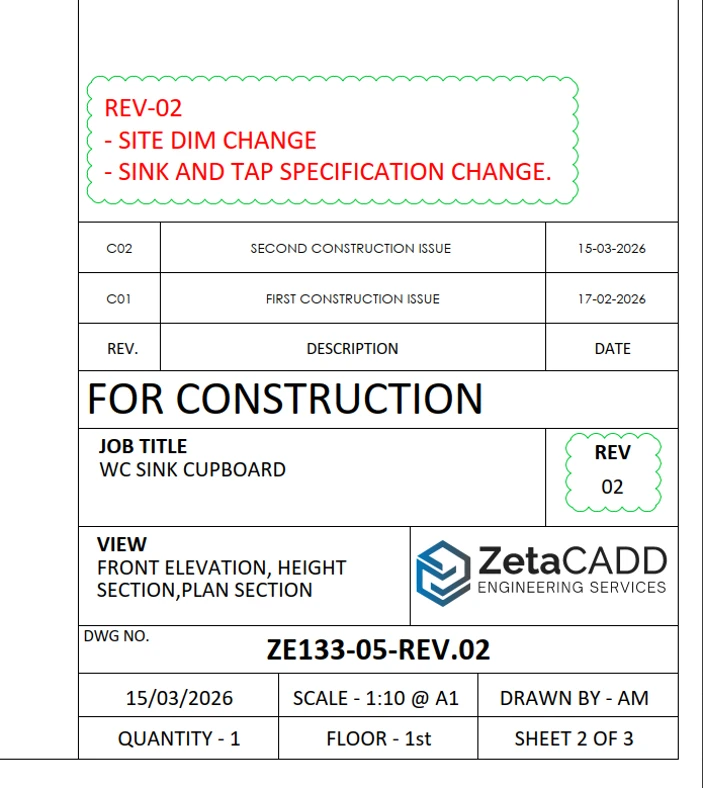
Before looking at a single cabinet box, an experienced reviewer looks at the frame. The title block is the control center of the drawing.
- The Non-Negotiables: Project name, clear scaling markers, drawing dates, and author names.
- The High-Value Nuance: The Revision Log and Revision Clouds. Construction sites are chaotic; architects issue Addendums, and interior designers change hardware mid-stream.
- The “Why”: If your drawing doesn’t explicitly highlight what changed between Revision 2 and Revision 4 using clear revision clouds, the shop floor might build the old version, or the site installer might prepare the wrong plumbing rough-ins.
2. The Body: The Orthographic Hierarchy
A flawless submittal follows a strict geometric storytelling format. It flows from macro-context down to micro-construction details.
A. The Main Elevation (The Macro Context)
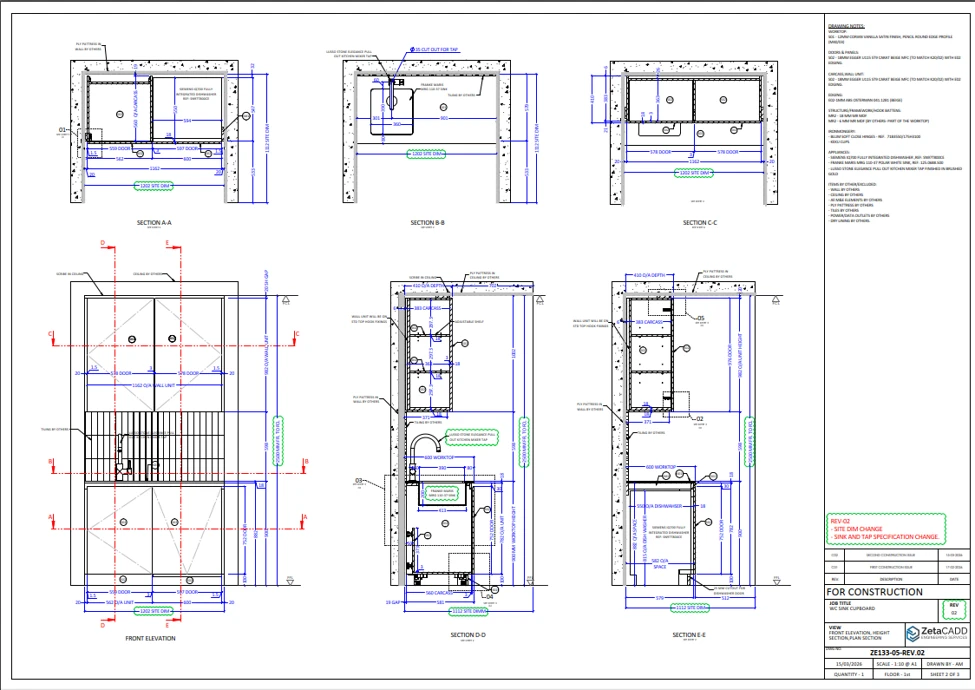
The elevation is the face-on view. It answers the architect’s primary question: Does this match my aesthetic intent?
- What to include: Overall width and height constraints, door and drawer front configurations, finish boundaries, and explicit grain direction indicators (especially vital for sequential wood veneers or heavily grained laminates).
- SolidWorks Advantage: Use your 3D model to generate a clean, unshaded 2D front view with hidden lines visible to show internal shelving layouts.
B. The Section View (The Construction Core)
If the elevation is for the architect, the section view is for the shop floor. This is where 90% of generic articles fail to provide detail.
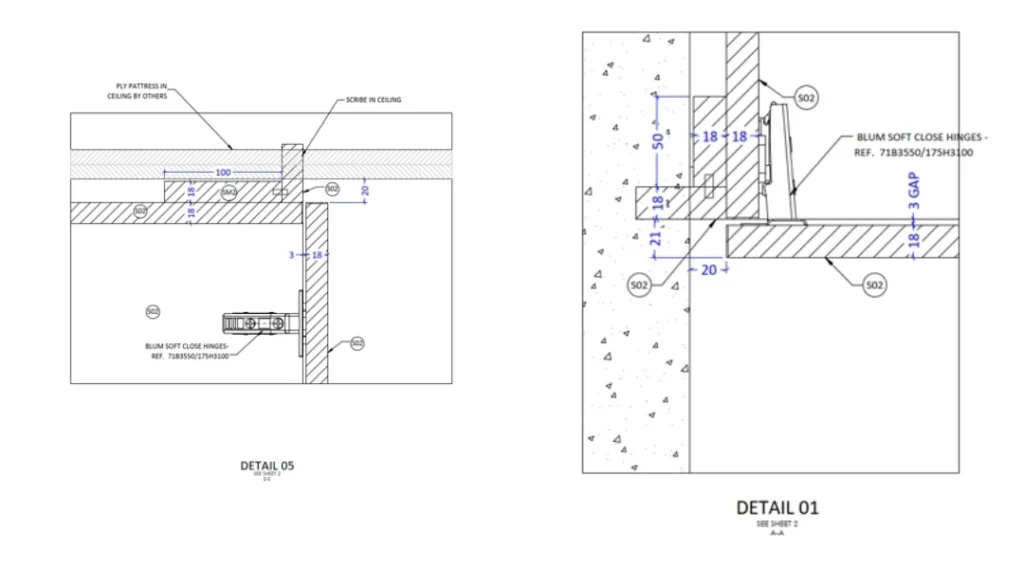
- What to cover: Take a vertical slice through critical areas (like the range hood or the sink cabinet). Show exact material thicknesses (e.g., 3/4″ NAUF MDF vs. 1/2″ drawer boxes), dados, rabbets, and mechanical fastening methods.
- The “Why”: A section view through a sink cabinet must show the internal structure, reveals, and drip edges. Without it, the shop cannot program the CNC routers accurately.
3. The Nervous System: Hardware & Trade Integration
Millwork does not exist in a vacuum. It interacts with appliances, utilities, and high-performance hardware. Your drawing anatomy must explicitly handle these collision zones.
Hardware Clearance Mapping
Never just write “drawer slides.” A professional drawing maps out the physical tolerances required for the hardware specified.
- The Detail: If specifying premium hardware, like Blum Tandembox slides, your plan view or cross-section must show the exact side clearances (e.g., 37mm setback patterns) and runner depths.
The Trade Collision Zone
Look at the farmhouse sink and the heavy gas range in our kitchen model. They represent major coordination risks.
- What to cover: Your drawings must feature clear MEP (Mechanical, Electrical, Plumbing) Coordination Notes. Call out cutouts for gas lines behind the range, plumbing traps under the sink, and electrical routes for integrated LED driver boxes.
4. The Shield: Tolerances, Scribes, and “VIF”
The digital world of SolidWorks is perfectly square, level, and plumb. The real world of drywall, concrete, and framing is absolutely not.
To bridge this gap, a flawless drawing incorporates defensive drafting.
- VIF (Verify in Field): Critical wall-to-wall or floor-to-ceiling dimensions must be flagged with a bold “VIF” stamp. This signals to the project manager that fabrication cannot begin until someone takes a physical tape measure or laser scanner to the job site.
- Scribe Fillers: Where the cabinetry meets the flanking plaster walls, the drawing must detail a dedicated scribe piece (typically 3/4″ to 1″ of extra material) that the installer can shave down on-site to match the irregularities of the wall perfectly.
5. The DNA: The Smart Bill of Materials (BOM)
The final anatomical element is data synchronization. Modern millwork relies heavily on CAD-to-CAM workflows (exporting SolidWorks data straight to CNC nesting software like Microvellum or Cabinet Vision).
Your drawing should include a comprehensive, clean Bill of Materials & Finishes table directly on the sheet or cross-referenced flawlessly.
| Item # | Component | Core substrate | Face / finish spec | Hardware / notes |
|---|---|---|---|---|
| 01 | Base Carcass | 3/4″ Maple Plywood | Prefinished Clear Coat | Pocket-screw construction |
| 02 | Door/Drawer Fronts | 3/4″ MDF | Paint Grade – Custom Match | Shaker profile, 5-piece const. |
| 03 | Countertop Substrate | 3/4″ Marine Grade Ply | N/A | Support layer for 3cm Slate |
By explicitly detailing the core substrates (e.g., specifying Marine Grade Plywood under the sink area to prevent moisture failure), you provide insurance for the shop and elevate the drawing to an architectural asset.
The Pre-Flight Submittal Checklist
Before hitting “Export to PDF” and sending your submittal package to the architect, run through this quick checklist to ensure your drawing’s anatomy is flawless:
- Are all Revision Logs up to date and matching the current submittal phase?
- Are grain directions clearly marked with arrows on all exposed wood veneer faces?
- Are VIF indicators present on all dimensions critical to wall-to-wall fitment?
- Are trade boundaries defined? (e.g., Is it clear who cuts the stone and who hooks up the gas?)
- Are sections keyed correctly to the main elevation sheets?